
Exploring the realm of smart home security unveils a landscape fraught with cyber threats. In this guide, we delve into the essential strategies and best practices to safeguard your smart home from potential vulnerabilities, ensuring a safe and secure digital environment for you and your family.
As we navigate through the intricacies of securing smart home devices, we uncover key insights and actionable steps to fortify your home against cyber threats.
Introduction to Smart Home Security
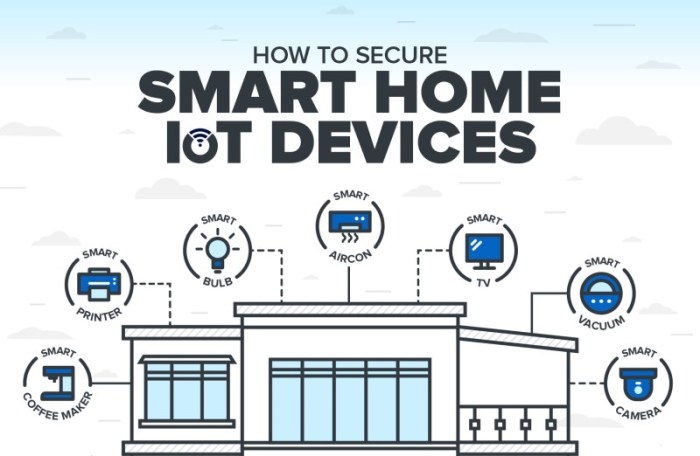
In today's digital age, smart homes have become increasingly popular due to the convenience and efficiency they offer. A smart home is equipped with various devices and appliances that can be controlled remotely through a smartphone or other networked device.
These devices include smart thermostats, security cameras, lighting systems, and more, all designed to make daily tasks easier and more automated.
While the benefits of a smart home are numerous, it is crucial to prioritize the security of these devices. With the increase in connectivity, smart homes have become targets for cyber threats and attacks. Hackers can exploit vulnerabilities in smart devices to gain access to personal information, monitor activities, or even take control of the entire home network.
Rise of Cyber Threats Targeting Smart Homes
According to a report by Symantec, cyber attacks on smart home devices have increased by 600% in recent years. This alarming statistic highlights the importance of taking proactive measures to secure your smart home and protect your privacy and security.
Common Cyber Threats to Smart Homes
In the age of interconnected devices, smart homes are vulnerable to various cyber threats that can compromise the security and privacy of residents. Hackers are constantly exploiting vulnerabilities in smart home devices to gain unauthorized access and control over these systems.
Malware Attacks
Malware attacks are one of the most common cyber threats to smart homes. Hackers use malicious software to gain access to smart devices, steal sensitive information, or disrupt normal operations. Once malware infects a smart home network, it can spread quickly and cause significant damage.
Phishing Scams
Phishing scams target smart home users through deceptive emails, messages, or websites, tricking them into revealing personal information or login credentials. Hackers use this information to access smart home devices and compromise the entire network.
Weak Passwords
Weak passwords are a major security risk for smart homes. Hackers can easily guess or crack simple passwords to gain unauthorized access to smart devices. It is crucial for smart home users to use strong, unique passwords for each device and regularly update them to enhance security.
Unsecured Wi-Fi Networks
Unsecured Wi-Fi networks pose a significant threat to smart homes. Hackers can intercept and eavesdrop on data transmitted over unencrypted Wi-Fi connections, compromising the privacy of smart home users. It is essential to secure Wi-Fi networks with strong encryption and unique passwords to prevent unauthorized access.
Best Practices for Securing Smart Home Devices
When it comes to securing your smart home devices, there are several best practices you should follow to protect your privacy and data. From setting up secure passwords to keeping your software up to date, these practices can help safeguard your smart home from cyber threats.
Setting Up Secure Passwords
- Choose complex passwords that include a mix of letters, numbers, and special characters.
- Avoid using default passwords that come with the device, as they are often easy to guess.
- Change your passwords regularly to reduce the risk of unauthorized access.
- Consider using a password manager to securely store and manage your passwords.
Keeping Software and Firmware Up to Date
- Regularly update the software and firmware of your smart home devices to patch any security vulnerabilities.
- Enable automatic updates whenever possible to ensure that your devices are always running the latest security patches.
- Check for updates regularly, as manufacturers may release security patches to address new threats.
- Keep track of end-of-life dates for your devices, as manufacturers may stop providing updates after a certain period.
Using a Secure Wi-Fi Network
- Secure your Wi-Fi network with a strong password and encryption to prevent unauthorized access.
- Change the default network name (SSID) and password to make it harder for attackers to target your network.
- Consider setting up a guest network for visitors to keep your primary network secure.
- Regularly monitor your network for any suspicious activity and consider using a virtual private network (VPN) for added security.
Implementing Network Security Measures
When it comes to securing your smart home devices, implementing network security measures is crucial in protecting your privacy and data. Setting up a separate network for your smart home devices, utilizing firewalls and antivirus software, and implementing network segmentation are key steps in enhancing the security of your smart home.
Setting Up a Separate Network for Smart Home Devices
Creating a dedicated network specifically for your smart home devices can help isolate them from your main network, reducing the risk of unauthorized access to your personal information. This separate network can act as a barrier, preventing potential cyber threats from spreading to your other devices.
Using Firewalls and Antivirus Software
Firewalls act as a protective barrier between your smart home devices and the internet, monitoring and controlling incoming and outgoing network traffic. By enabling firewalls on your router and individual devices, you can block malicious data packets and unauthorized access attempts.
Additionally, installing antivirus software on your devices adds an extra layer of security by detecting and removing malware, viruses, and other malicious software that could compromise the security of your smart home network.
Implementing Network Segmentation
Network segmentation involves dividing your network into smaller subnetworks to limit the exposure of your devices to potential cyber threats. By separating your smart home devices from other devices on your network, you can contain security breaches and prevent unauthorized access to sensitive data.
Securing Smart Home Cameras and IoT Devices
When it comes to securing smart home cameras and IoT devices, it is crucial to take proactive steps to protect your privacy and prevent unauthorized access to your home network.
Changing Default Settings on Smart Home Cameras
Smart home cameras often come with default settings that may not be the most secure. It is essential to change these settings to enhance the security of your devices
- Change the default username and password: One of the first things you should do is change the default username and password on your smart home camera. Using the default credentials makes it easy for hackers to gain access to your device.
- Update firmware regularly: Manufacturers frequently release firmware updates to address security vulnerabilities. Make sure to keep your smart home camera's firmware up to date to protect against potential threats.
- Disable remote access when not needed: If you do not require remote access to your smart home camera, consider disabling this feature to reduce the risk of unauthorized access.
Risks of Using Default Passwords on IoT Devices
Default passwords on IoT devices pose a significant security risk as they are often easy to guess or widely known among hackers.
- Weak passwords: Default passwords are generally weak and easily cracked by attackers. It is crucial to set a strong, unique password for each IoT device to prevent unauthorized access.
- Password reuse: Reusing passwords across multiple devices can amplify the risk of a security breach. Ensure that each IoT device has a distinct password to enhance security.
Securing IoT Devices through Encryption and Authentication Methods
Encryption and authentication play a vital role in safeguarding IoT devices from cyber threats.
- Implement encryption protocols: Enable encryption on your IoT devices to protect data transmission from eavesdropping and interception.
- Two-factor authentication: Utilize two-factor authentication to add an extra layer of security to your IoT devices. This method requires users to provide two forms of verification before accessing the device.
- Network segmentation: Separate IoT devices from your primary home network through network segmentation to minimize the impact of a potential security breach.
Monitoring and Detecting Suspicious Activity
Monitoring and detecting suspicious activity in your smart home network is crucial to maintaining a secure environment. By keeping a close eye on network traffic and setting up alerts for potential security breaches, you can proactively protect your devices and data.
Monitoring Network Traffic for Unusual Patterns
One way to monitor network traffic for unusual patterns is to use network monitoring tools that can provide insights into the data flowing through your network. Look for any spikes in traffic, unusual connections, or unknown devices trying to access your network.
- Regularly review logs and reports from your router or network monitoring software to identify any anomalies.
- Set up alerts for any sudden increase in network activity or suspicious connections.
- Monitor the devices connected to your network and investigate any unknown or unauthorized devices.
Importance of Intrusion Detection Systems for Smart Homes
Using intrusion detection systems (IDS) can help you detect and respond to potential threats in real-time. These systems can monitor network traffic, analyze patterns, and alert you to any suspicious activity that could indicate a security breach.
- Install an IDS specifically designed for smart homes to protect your devices from cyber threats.
- Configure the IDS to monitor all incoming and outgoing traffic to detect any unauthorized access attempts.
- Regularly update the IDS to ensure it can detect the latest threats and vulnerabilities.
Setting Up Alerts for Security Breaches
Setting up alerts for potential security breaches in smart home devices can help you take immediate action to mitigate the risks. By receiving notifications of any suspicious activity, you can quickly investigate and address any security issues.
- Configure alerts on your smart home devices to notify you of any unauthorized access attempts or unusual behavior.
- Set up alerts on your mobile device or email to receive notifications instantly when a security breach is detected.
- Regularly test the alert system to ensure it is working effectively and you are promptly notified of any security incidents.
Ending Remarks
In conclusion, safeguarding your smart home from cyber threats demands vigilance and proactive measures. By implementing the recommended strategies and staying informed about emerging threats, you can create a resilient defense system that protects your privacy and security in the digital age.
FAQ Summary
How can I create secure passwords for my smart home devices?
To create secure passwords, use a combination of letters, numbers, and special characters. Avoid using easily guessable information like birthdays or pet names. Regularly update your passwords for enhanced security.
Why is it important to update software and firmware for smart home devices?
Updating software and firmware patches vulnerabilities that hackers could exploit. It ensures that your devices have the latest security features to protect against emerging threats.
How can I monitor network traffic for suspicious activity in my smart home?
You can use network monitoring tools to track data flow and identify any abnormal patterns. Look out for unexpected connections or data transfers that could signify a security breach.